
WEEKLY NEWSLETTER
Your First AI Hire Is a Scheduled Task


© CURRENT YEAR, AI Business Lab. All rights reserved.
You don’t need a smarter AI. You need to stop being the one pressing the button. Until that flips, every new tool just adds more work to your plate.
I’ve been using email since before AOL was a thing. For years, I managed it all myself, even though I had an executive assistant. It never really occurred to me to delegate it to her. I prided myself on fast responses and getting to inbox zero every single day.
That was a different time. Back then, I had one inbox. This was before social media, before Slack, before Discord, before Circle. Now most of us juggle a dozen inboxes, and email alone was eating sixty to ninety minutes of my day.
About a year after I hired Jim, my current EA over a decade ago, I finally delegated it to him. He’s done a phenomenal job ever since. But a few months ago, a question started nagging at me: Does a human still need to do this? What if I could free Jim up to do other things only he can do?
So I built an email triage skill in Claude. Now every morning at 8:00 a.m., without my asking, Claude goes through my inbox. It labels what needs action, flags what needs a reply, and files the rest as information only. For the last few weeks, it’s run flawlessly.
This week, I’m ready to hand it to Jim as his first AI employee.
That story is not really about email. It’s about a leap.
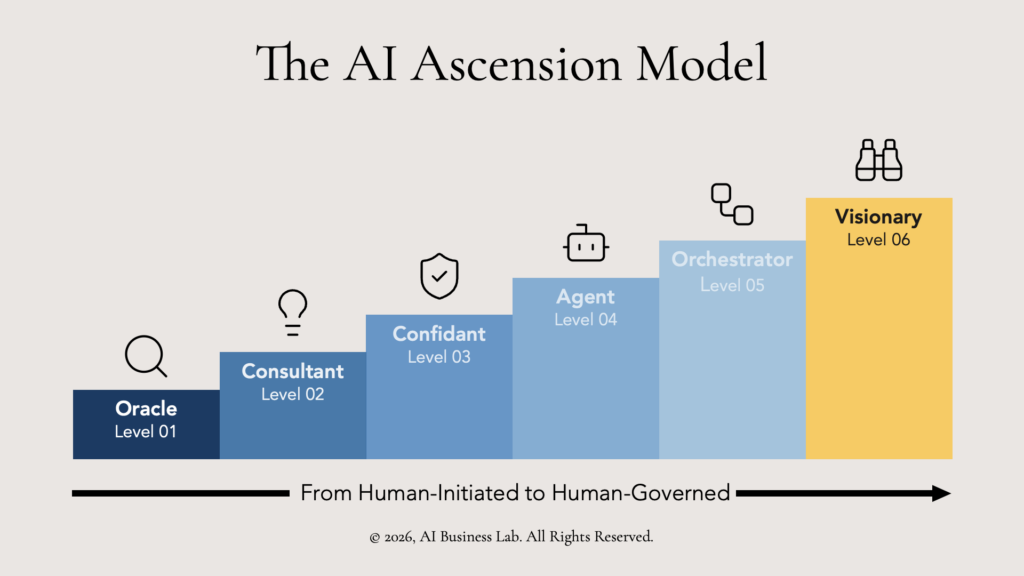
It’s about the leap from Level 3 (AI as your “Confidant”) to Level 4 (AI as your “Agent”) in the AI Ascension Model. This is the framework I sketched out in last week’s newsletter. For reference, here’s the model again.1
Before we go further, a word on vocabulary. Most of what is being sold as an “AI agent” or “AI employee” on social media is not really an agent. It’s a Scheduled Task—a recurring workflow that uses AI for the cognitive steps but runs on a fixed schedule, in a fixed order, every time.
A true autonomous agent decides for itself what to do next. Almost nothing being marketed to small business owners today does that. It’s mostly hype.
And here’s the demystification most owners miss. In Claude’s case, the agent IS Claude. A Scheduled Task is just Claude with an SOP, the right connectors, and a schedule, running a workflow without you. There is no separate “agent” to build.
“Scheduled Tasks” (Level 4a) is the better name. They are the honest first move toward true autonomous agents (Level 4b). What you can build today is the first one. That is what I built. Here are the five steps that get you there.
The typical worker receives more than 120 emails a day and spends roughly 2.6 hours processing them.2 That is a lot of leverage hiding inside one daily SOP.
Step 1: Choose the Right Workflow
Not every task should be automated. The best candidates for AI workflow automation share four traits. They are:
- Frustrating (a chore you dread),
- Time-consuming (it eats a meaningful chunk of your week),
- Essential (skipping has real consequences), and
- Consistent (it follows the same steps every time).
That last criterion is the filter most owners miss. A workflow with lots of judgment calls is hard to automate. A workflow with a clear, repeatable path is easy. Start with the boring, predictable stuff.
Email triage fits all four. It is frustrating, time-consuming, essential, and consistent. The same five or six categories of message arrive every day. What is being sold as “AI agents for small business” almost always starts here. The payoff is fast and the risk is small.
Your move: List three workflows that meet all four criteria. Rank them by hours consumed each week. Start with number one.
Step 2: Map It Like a Recipe
Before you build anything, write the SOP. Pretend you are training a new hire who is smart but knows nothing about your process. Be obsessively specific.
A good SOP captures five things: the vision you have for the task, trigger that starts the workflow, the inputs it needs, the steps in order, and the output format.
For my email triage: email processed every 24 hours, 7:00 a.m. daily trigger, unread inbox in, manual steps I go through, and drafts in Gmail waiting for my approval.
Your move: Run the workflow once while narrating every step aloud. Record it. That narration is your first draft.
Step 3: Define What “Done” Looks Like
Before you build anything, answer the question: how will I know it is working?
This step seems obvious. Almost everyone skips it. Without a definition of done, “iterate until it works” has no finish line, and you will keep tweaking forever.
Write down your success criteria. What does good output look like? What is the acceptable error rate? What would make you trust it enough to run unsupervised?
For email triage, three things:
- drafts in my voice (not generic AI),
- correct classification ninety percent of the time, and
- zero auto-sends until two weeks of parallel running.
Your move: Find three examples of great output from the last time you ran this workflow manually. Save them. Those are your reference standard.
Step 4: Build It With Claude
This is where the work happens. Nine mini-steps, in order.
- Set up a Cowork project for this workflow. This is the container where the SOP, the connectors, and the schedule will live.
- Upload your SOP to Claude. Ask it to flag anything ambiguous, missing, or that needs a connector. The AI will catch what you skipped.
- Plan the architecture together. Decide what you will use: which connectors, what trigger, what output.
- Install the connectors before you write any skill code. For me, that meant connecting Gmail with the right OAuth scopes.
- Build v1 in draft mode first. Do not let the first version actually do anything. If it sends emails, create drafts. If it files records, show a filing plan for approval. Trust is earned, not assumed.
- Run it in shadow mode. Let the AI email assistant draft replies in parallel with your manual process for two weeks. Compare them side by side every morning.
- Iterate against the Step 3 success criteria. Keep iterating until the output consistently matches.
- Formalize the workflow as a skill. You want a markdown file capturing the SOP, the connectors, the prompt, and the output spec. (You don’t need to know how to do this. Just tell Claude to create the skill based on your conversation with it.)
- Schedule it. That’s it. You’re done with this step.
Step 5: Let It Run
Once scheduled, your role shifts from operator to supervisor. Three moves matter.
Start with a review period: check every output for the first two weeks. Build confidence before you extend trust.
Keep human approval in the loop for anything irreversible (sends, deletes, publishes). My email triage still does not auto-send. It drafts. I read. I send.
Reduce gradually. Move from “review every output” to “spot-check weekly” to “only alert me if something breaks.”
The Five Steps as One Arc
Move from “I ask Claude questions” to “Claude runs my workflows” by turning your best processes into recipes, building them in draft mode first, and gradually extending trust as the output earns it.
That is what the climb from Level 3 to Level 4a looks like in practice, with one workflow. Email triage is the easy first one because almost everyone has it and almost everyone hates it.
The freedom you started your business for is not on the other side of more tools. It is on the other side of fewer manual workflows. One SOP at a time.
What is the one workflow you dread most every week, and what would it take to make it your first Scheduled Task?
Comments
If you have a question about using AI to create scheduled tasks, click here to send me an email. I read every one. Seriously. Your experiences help me write better content, and sometimes the best insights come from readers like you.
Transforming AI from noise to know-how,

P.S. Consider the AI Business Lab Mastermind: Running a $3M+ business? You’re past the startup chaos but not quite at autopilot. That’s exactly where AI changes everything. The AI Business Lab Mastermind isn’t another networking group—it’s a brain trust of leaders who are already implementing, not just ideating. We’re talking real numbers, real strategies, real results. If you’re tired of being the smartest person in the room, this is your new room. 👉🏼Learn more and apply here.
REFERENCE
- Michael Hyatt, ”The 6-Level AI Roadmap to Freedom,” AI Business Lab Insider, May 12, 2026. ↩︎
- Rebekah Carter, “How to master email triage in 2026,” Jotform, October 13, 2025. ↩︎