
WEEKLY NEWSLETTER
Your AI Isn’t Underpowered. It’s Underconnected.

© CURRENT YEAR, AI Business Lab. All rights reserved.
Your AI has given you good advice for a year. What if it could actually help run the business?
For years, I practiced Inbox Zero. I got good at it.
But somewhere in the last decade, I started losing. Every year I ceded a little more ground. Every morning felt like I was Sisyphus. No sooner had I emptied my inbox than a fresh avalanche of new messages buried me again.
Here’s what I didn’t see at the time. My inbox was running a low-grade stress in the background of my life. Not a crisis. Just a hum. A quiet, constant pressure that never fully switched off. Not on a good day. Not on a weekend. Not even on vacation.
A few months ago, I had a thought. What if AI could help?
It couldn’t be that hard. I follow the same predictable protocol every single day.
So what if I built an agent that scanned my inbox a couple of times a day and tagged every message with one or more of ten tags? For anything tagged “Needs reply,” it would draft a response in my voice and queue it up in my drafts folder for review.
I’m pleased to report: it works.
Imagine focusing on your real work without the hum. Imagine never writing that first draft again. Imagine having a fighting chance against the email avalanche.
The Advisor Trapped in a Chat Window
Here’s the gap most business owners never name. Your AI is a brilliant advisor that can’t do much by itself.
It tells you how to clear your inbox, drafts a plan, summarizes a contract, or helps you think through a decision. Then it sits behind a chat window and waits for you to copy, paste, upload, and do the actual work yourself.
That changes the moment you start using connectors.
I’ll use Claude as the example here, but the principle applies to any AI platform with connectors.
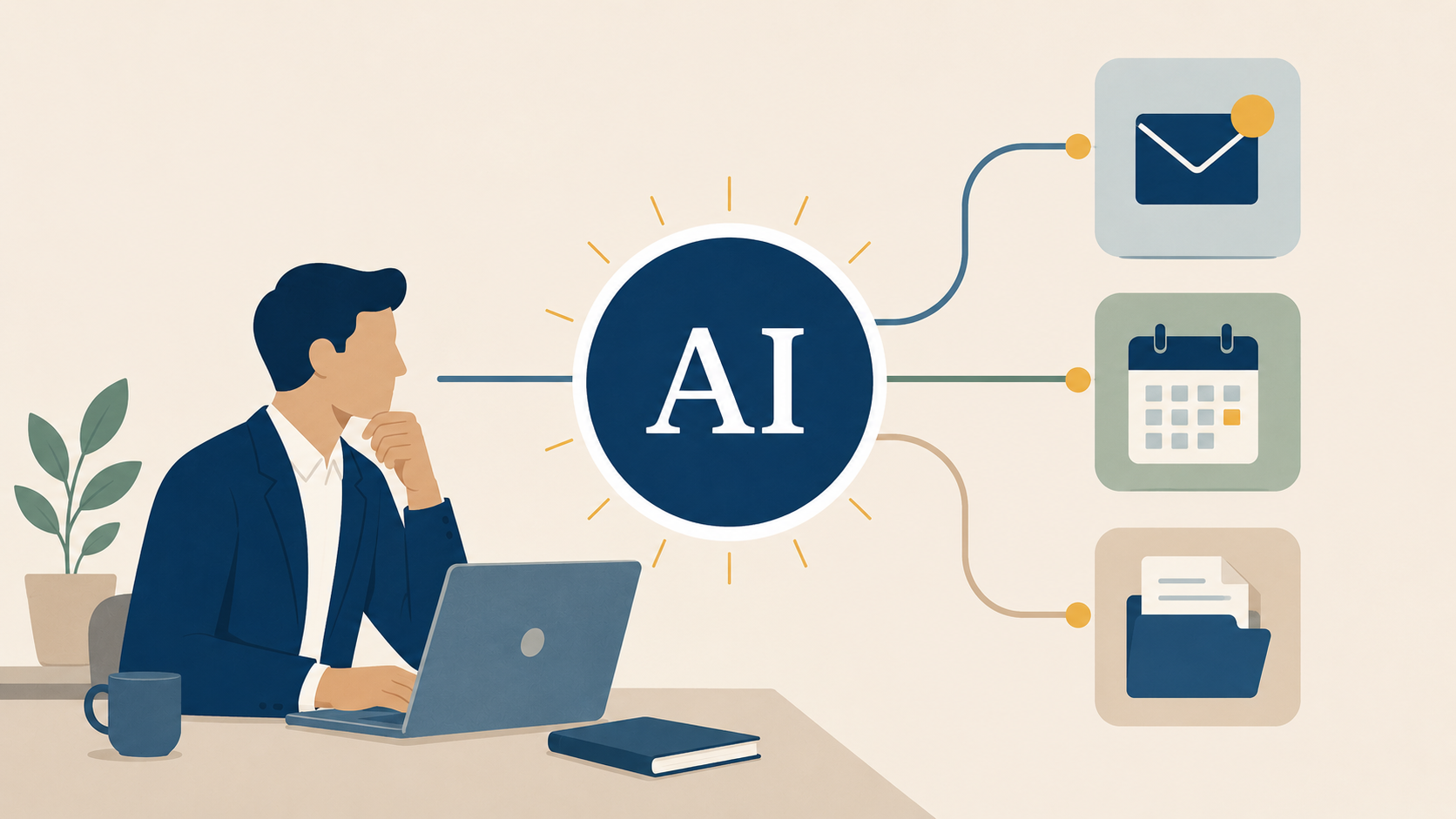
A connector is a secure bridge between Claude and a tool you already live in. Your email. Your calendar. Your files. It gives Claude context without forcing you to drag every document into the chat one at a time.
Context is what turns advice into action.
That moves AI across an important line on the AI Ascension Model: from Level 3, the Confidant who advises you, to Level 4, the Agent who acts with you.1
That last phrase matters: with you. You are still the leader. You still make the decisions. You still approve the work. But now Claude can see the raw material it needs to help.
Here’s what I’ve discovered: AI doesn’t become useful because it’s smarter. It becomes useful because it has context.
Every business owner can turn AI from an advisor into an agent by connecting three sources of context: your inbox, your calendar, and your files.
Move #1: Connect Your Inbox
Start where the pain is loudest. For most leaders, that’s email.
The numbers are brutal. McKinsey found that the average knowledge worker spends 28 percent of the workweek managing email, about 2.6 hours every single day.2 That’s not the worst part.
Researchers at UC Irvine discovered that constant email keeps workers in a state of high alert. When they cut people off from email, their stress dropped and their heart rates returned to normal.3
That’s the hum I described. It has a name, and it has a cost.
Now picture AI email triage running in the background.
You connect Claude to Gmail or Outlook, and a couple of times a day it reviews your new messages.
If you use Microsoft 365, Claude can still search and summarize Outlook email. But Microsoft's connector is currently read-only. It cannot apply categories, archive messages, create Outlook drafts, or take action inside your inbox. Hopefully Microsoft expands those capabilities in the future.
It sorts each one under a clear tag and drafts replies in your voice for the ones that need them.
You review the drafts, make any changes you want, and decide whether to send them.
You open your inbox to a sorted queue and a stack of first drafts, not a wall of two hundred unread messages. You’re no longer the bottleneck. You’re the editor.
This is where the productivity principle from Free to Focus comes in: the goal is not to do more things faster. The goal is to do the right things.
Your inbox is full of low-leverage decisions masquerading as urgent work. Claude can help you separate what matters from what merely makes noise.
Move #2: Connect Your Calendar
Your calendar is the second tool that runs your day. It also reveals the truth about your priorities.
You may say your Weekly Big 3 matter most. Your calendar will either confirm that—or expose the gap.4
When you connect Claude to your calendar, it can help you evaluate your week before you’re trapped inside it.
Ask Claude to review the appointments on your calendar for the coming week against your Weekly Big 3. Have it flag every meeting that doesn’t clearly support one of those priorities.
It should not cancel anything for you. That’s your job. But it can surface the misalignment so you can decide what to eliminate, delegate, or reschedule.
Then ask it to prepare you for the meetings that remain.
For every new person on your calendar, Claude can create a short background dossier.
Pair your calendar with a data source like Apollo.io or ZoomInfo, and Claude can assemble the person’s role, company, background, and recent news into a one-page brief. You walk into the conversation prepared, not cold.
It can also help you pick up the thread with your direct reports.
Ask Claude to review your last meeting notes, emails, or transcripts with each team member. Have it summarize what you discussed, what you promised, what they promised, and what needs follow-up.
Instead of wasting the first ten minutes reconstructing the past, you can start with, “Last time we talked about…”
That may sound small. It isn’t. Leadership runs on context. When you lose context, meetings get fuzzy. Decisions slow down. Accountability leaks.
Claude can’t replace your judgment. But it can hand your judgment better information.
Move #3: Connect Your Files
Your files are where your business memory lives.
Contracts. Proposals. SOPs. Meeting notes. Financial reports. Strategy docs. Customer research.
The problem is that most of this knowledge is buried in folders no one wants to open. It’s not a library. It’s an attic.
When you connect Claude to your files, that changes. Claude can read across the documents your business already runs on and help you find the signal in the stack.
This is where the Free to Focus framework becomes practical.
Ask Claude to search your SOPs and identify recurring tasks that should be eliminated, automated, or delegated.
Ask it to review last quarter’s project documents and identify where your team keeps getting stuck.
Ask it to compare won and lost proposals and show you the patterns.
Suddenly your files stop being storage and become leverage.
Last week I asked Claude to propose a plan for reorganizing my entire Google Drive. Once I reviewed and approved the plan, I turned it loose.
Thousands of files renamed, dated, and sorted into a structure that finally makes sense. It did in two hours what I had been avoiding for two years.
But that project taught me something important. The magic wasn’t that Claude reorganized my files. The real breakthrough was that it first proposed a plan. I reviewed it, approved it, and only then let it execute.
That’s how effective agents work. You provide the judgment. The agent provides the labor.
Once you do, you can ask better questions:
Which contracts renew this quarter? Which workflows are undocumented? Which projects are stalled because I’m still the bottleneck? Which tasks belong on my Not-to-Do List?
That’s when Claude stops being a search box and starts becoming an operating system for your business memory.
A Word About Permissions
This is where many leaders get nervous. Fair enough.
Connecting AI to your inbox, calendar, or files should raise your standards, not lower them. The good news is that these connectors are permission-based and controllable.
Claude can only access what the connected account can access, and many workplace connectors are designed for retrieval and analysis rather than independent action. You can also disconnect tools, restrict access, or require approval before sensitive steps.5
The point is not to hand Claude the keys to the kingdom. The point is to give it enough context to help while keeping you firmly in control.
From Advisor to Agent
Three moves. Connect your inbox. Connect your calendar. Connect your files.
Together, they carry AI across one line: from the Confidant who tells you what to do, to the Agent who helps you do it.
You provide the judgment. The agent provides the labor.
You don’t have to make all three moves this week. Start with one. Give AI one tool, one job, and one clear boundary. Then watch what happens.
That’s the moment AI stops being another app to manage and starts becoming a source of leverage.
And leverage is what makes the Double Win possible: winning at work and succeeding at life.
Which one connector, if you set it up this week, would give you back the most margin?
Comments
If you have a question about using AI connectors, click here to send me an email. I read every one. Seriously. Your experiences help me write better content, and sometimes the best insights come from readers like you.
Transforming AI from noise to know-how,

P.S. Consider the AI Business Lab Mastermind: Running a $3M+ business? You’re past the startup chaos but not quite at autopilot. That’s exactly where AI changes everything. The AI Business Lab Mastermind isn’t another networking group—it’s a brain trust of leaders who are already implementing, not just ideating. We’re talking real numbers, real strategies, real results. If you’re tired of being the smartest person in the room, this is your new room. 👉🏼Learn more and apply here.
REFERENCE
- Michael Hyatt, “The 6-Level AI Roadmap to Freedom” AI Business Lab, accessed May 31, 2026. ↩︎
- “The Social Economy: Unlocking Value and Productivity Through Social Technologies,” McKinsey Global Institute, July 2012. ↩︎
- “Jettisoning Work Email Reduces Stress,” UC Irvine News, May 3, 2012. ↩︎
- Michael Hyatt, Free to Focus: A Total Productivity System to Achieve More by Doing Less (Grand Rapids, MI: Baker Books, 2019), 190. ↩︎
- “Use Google Workspace Connectors,” Claude Help Center, accessed May 31, 2026 and “Microsoft 365 Connector Security Guide,” Claude Help Center, accessed May 31, 2026. ↩︎