
WEEKLY NEWSLETTER
The AI Connectors Every Business Owner Needs

© CURRENT YEAR, AI Business Lab. All rights reserved.
Your AI doesn’t know who you are, what’s on your calendar, or what’s in your inbox. Every conversation starts from scratch. Connectors fix that.
My wife Gail and I were working in our den last week. She was on her computer; I was on mine. I’m the de facto tech support in our relationship, so when she has a question, she asks me.
“Is there a better way to get my output from Claude into Google Docs,” she said, “than just cutting and pasting?”
I stopped what I was doing. “Wait a minute—you don’t have a connector set up for that?”
She looked at me blankly. “What’s a connector?”
So I walked her through it. Once Google Docs is connected to Claude, you just tell Claude to create a Google Doc, formatted exactly the way you want it. I showed her how to connect Claude to Google Calendar, Gmail, Apple Reminders, and iMessage.
It didn’t seem like a big deal. Then she started using it.
“This changes everything,” she said. Then she said something she’s said before: “Michael, you take for granted that people understand these things. They don’t. And I’m proof of it.”
She was right. Gail uses Claude every day. Yet she was still cutting and pasting.
Working without connectors is like working on your computer without being connected to the internet. You’re isolated. You’re limited. And you don’t even know what you’re missing.
If Gail didn’t know about AI connectors, I suspect most business owners don’t either.
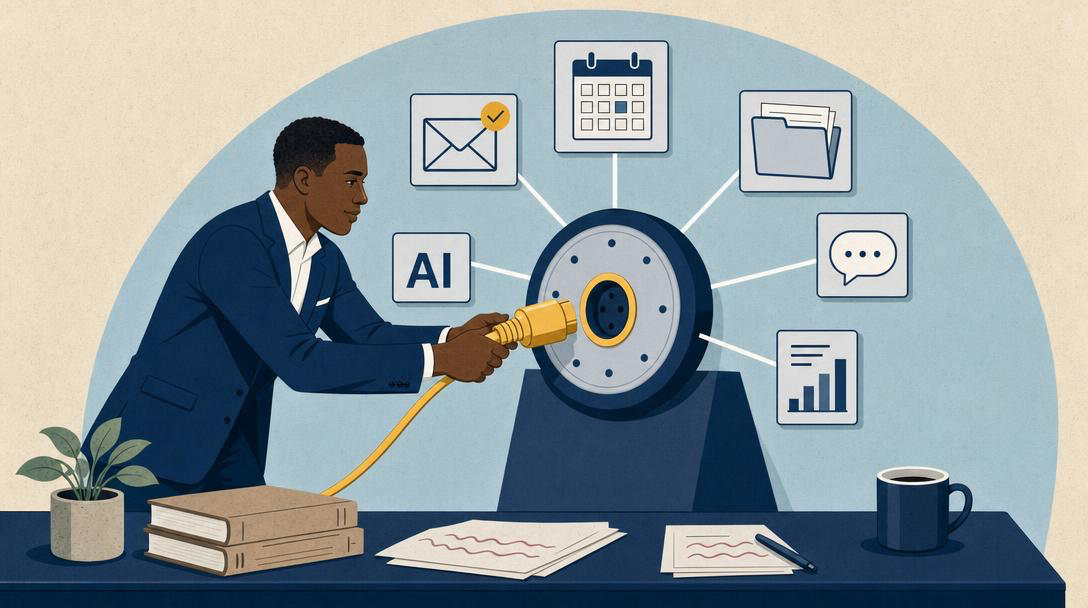
An AI connector—technically called a Model Context Protocol server, or MCP server—is a bridge between your AI and the tools you already use. By default, your AI is isolated. It can answer questions, write content, and analyze whatever you paste into the chat. But it doesn’t know what’s in your calendar, your inbox, or your files. Every session starts from scratch.
Connectors change that. They create a live link between your AI and the rest of your digital world.
One thing most people don’t realize: AI connectors aren’t exclusive to Claude. ChatGPT, Perplexity, and Runner1 all support them. Claude and ChatGPT currently offer the most out-of-the-box options. Gemini and Grok support fewer—though that’s changing quickly.
Any business owner can unlock dramatically more from their AI by wiring up the right connections. Here are four types that will transform what your AI can do for you. It’s easier than you think.
Connection #1: Access Your Work
Your AI doesn’t know what’s in your Google Drive, your meeting notes, or your quarterly reports. Without a connector, you either paste that content manually into every conversation—or you work without it.
Wire up your files, and that changes. Ask Claude to read your Q3 report and flag the three trends worth raising in your board meeting. Have it pull your project folder, identify what’s been completed, and surface what’s at risk. Ask it to review notes from your last three client calls before you draft a proposal.
The same applies to your calendar and tasks. Connect your scheduling and task management tools, and your AI knows what’s ahead. It can help you plan your week, prep for a specific call, or flag a conflict before you make a commitment.
A few connectors to wire up first:
- Google Drive—searches and reads your Docs, Sheets, and Slides
- Google Calendar—checks your schedule, flags conflicts, and manages invites
- Notion—connects your workspace so Claude can search and update it
- Dropbox—browses, organizes, and acts on your files
- Microsoft 365—covers files, calendar, SharePoint, and Teams in one connector (for Microsoft shops)
- Filesystem—gives Claude direct access to files and folders on your Mac
Workers lose more than three hours a week just searching for information that already exists somewhere in their organization.2 A connected AI can find that information for you—in seconds.
Connection #2: Read Your Communications
Email is where commitments are made. It’s also where they quietly die.
Your team sends updates, clients send questions, and important threads pile up in folders you haven’t touched in a week. Without a connector, your AI has no idea any of it is happening.
Connect your email and messaging tools—Gmail or Outlook, Slack, iMessage—and the picture changes. “Which emails from this client still need a response?” “What did my team discuss in Slack this week that requires my response?” “Is there anything in my inbox I should handle before my 10 o’clock call?”
Those aren’t hypothetical. They’re questions your AI can answer in seconds, once it can actually see your inbox.
Start with these:
- Gmail or Outlook—drafts replies, summarizes threads, and searches your inbox
- Slack—reads channel history and sends messages on your behalf
- Microsoft 365—accesses Outlook and Teams conversations directly in Claude
- Read and Send Messages—connects Claude to iMessage on your Mac
Research consistently shows that professionals spend more than a quarter of their workday managing email—and Microsoft’s 2025 Work Trend Index found the average worker now receives 117 emails a day.3 That number drops when your AI can triage, draft, and summarize on your behalf.
Connection #3: Act Inside Your Tools
The first two connections are about reading. This one is about doing.
Once your AI is wired into your tools, it can take action inside them—not just advise you on what to do next. Tell Claude to create a Google Doc, formatted exactly the way you want, and it does. Ask it to block time on your calendar. Have it turn a meeting summary into a set of follow-up tasks in your project management app.
The connectors that make this possible:
- Google Drive—creates, formats, and edits documents on command
- Google Calendar—blocks time, schedules meetings, and sends invites
- Slack—sends messages and creates canvases on your behalf
- Asana—creates tasks and updates projects from a conversation
- Control your Mac—runs AppleScript so Claude can automate apps and system settings on macOS
This is the shift from AI-as-advisor to AI-as-teammate. An advisor tells you what to do. A teammate does it with you.
When your AI can act inside the tools you already use, it stops being one more platform to manage. It becomes part of the workflow you’ve already built.
Connection #4: Build What the Platforms Haven’t
Here’s where most business owners stop too soon.
The AI connector ecosystem is growing fast. More than 6,400 official MCP servers are available today, with nearly 100 million SDK downloads worldwide.4 But thousands of business tools don’t yet have a ready-made connector—your industry-specific CRM, your accounting platform, your custom workflow software.
When a connector doesn’t exist, you don’t have to wait for someone to build it. Describe what you need to your AI—which tool you use, what information you want it to access—and in many cases, it can generate a working MCP server for you in a single conversation.
This is where the gap between informed and uninformed business owners starts to widen. The default boundaries of your AI platform aren’t fixed. They’re a starting point.
What Becomes Possible
Most people are using their AI at a fraction of its potential. Not because the AI isn’t capable. Because it’s working blind.
When you wire up your files, your communications, your tools, and your custom connections, you’ve built something meaningfully different from the out-of-the-box experience. You’ve given your AI a window into how your business actually works.
Imagine starting Monday morning by asking your AI a question—and getting an answer grounded in your calendar, your email, your latest data, and last week’s meeting notes. No copy-pasting. No re-explaining the context. Just a genuine answer built on your actual situation.
That’s not far off. For the business owners who get this right now, it’s already real.
What’s one connection you could wire up this week that would change the way you work?
Comments
If you have a question about wiring up AI connectors—or a favorite you think I should try, click here to send me an email. I read every one. Seriously. Your experiences help me write better content, and sometimes the best insights come from readers like you.
Transforming AI from noise to know-how,

P.S. Consider the AI Business Lab Mastermind: Running a $3M+ business? You’re past the startup chaos but not quite at autopilot. That’s exactly where AI changes everything. The AI Business Lab Mastermind isn’t another networking group—it’s a brain trust of leaders who are already implementing, not just ideating. We’re talking real numbers, real strategies, real results. If you’re tired of being the smartest person in the room, this is your new room. 👉🏼Learn more and apply here.
REFERENCE
- Runner is the AI agent platform I use daily to automate my briefings, carousels, email triage, and more. Download it free here. When you buy a paid plan, you get a free month of standard tier usage—and so do I. It costs you nothing extra and helps support AI Business Lab. ↩︎
- “Enterprise Search Survey Findings”, Slite, January 2026. ↩︎
- “Breaking Down the Infinite Workday”, Microsoft Work Trend Index, June 17, 2025. ↩︎
- “Model Context Protocol (MCP) Adoption Statistics 2026”, Digital Applied, 2026. ↩︎